
Steps
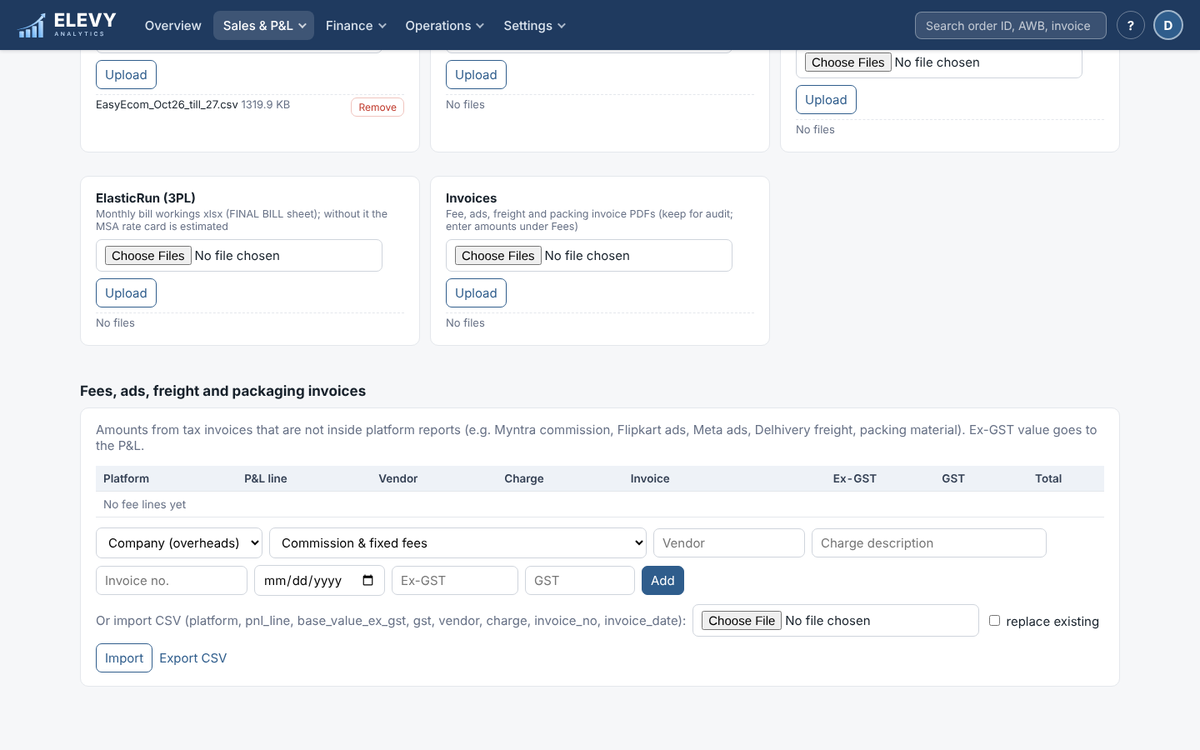
- On the month page scroll to Fees.
- Choose the platform and P&L line, type the vendor, invoice number, base value ex-GST and GST, and click Add.
- Packing material: use Settings > Packaging material instead (booked per dispatched order, invoices claimed for GST in their month). Packaging lines added here are replaced by it from its 'Book from' month.
- Salaries, rent, software: platform 'Company (not a platform)', line Company overheads. They sit below channel profit, are shared across platforms by sales and give EBITDA. Add one line per month.
- One-time charges such as a marketplace onboarding fee: the platform, line 'One-time / onboarding'. It goes to company overheads, so it does not make that platform's products look loss-making or inflate its fee rate.
- Or import many lines at once with Import CSV.
- PDF invoices placed in the month's folders (Meta, checkout app, Easebuzz ...) are read automatically.
Good to know
- Until an ads invoice is added, the spend reported by Meta / PLA reports is used as a provisional ads line.
- Bills in any format (PDF, CSV, Excel, ZIP, many at once) can also go to Finance > Vendor invoices: each is read, filed into its month and booked to its P&L line; a new supplier is added with its GSTIN and state.